Serilog.Formatting.Compact.Reader 4.0.0
Serilog.Formatting.Compact.Reader 

This package reads (deserializes) JSON log files created by Serilog.Formatting.Compact back into Serilog LogEvents.
Example
Log events are written to a file using CompactJsonFormatter:
await using var fileLog = new LoggerConfiguration()
    .WriteTo.File(new CompactJsonFormatter(), "log.clef")
    .CreateLogger();

fileLog.Information("Hello, {@User}", new { Name = "nblumhardt", Id = 101 });
fileLog.Information("Number {N:x8}", 42);
fileLog.Warning("Tags are {Tags}", new[] { "test", "orange" });

try
{
    throw new DivideByZeroException();
}
catch(Exception ex)
{
    fileLog.Error(ex, "Something failed");
}
This creates a log file with content similar to:
{"@t":"2024-10-12T04:46:58.0554314Z","@mt":"Hello, {@User}","User":{"Name":"nblumhardt","Id":101}}
{"@t":"2024-10-12T04:46:58.0684369Z","@mt":"Number {N:x8}","@r":["0000002a"],"N":42}
{"@t":"2024-10-12T04:46:58.0724384Z","@mt":"Tags are {Tags}","@l":"Warning","Tags":["test","orange"]}
{"@t":"2024-10-12T04:46:58.0904378Z","@mt":"Something failed","@l":"Error", "@x":"System.DivideByZer...<snip>"}
An instance of LogEventReader converts each line of the log file back into a LogEvent, which can be manipulated, rendered, or written through another Serilog sink:
await using var console = new LoggerConfiguration()
    .WriteTo.Console()
    .CreateLogger();

await using var clef = File.OpenText("log.clef"))

var reader = new LogEventReader(clef);

while (reader.TryRead(out var evt))
    console.Write(evt);
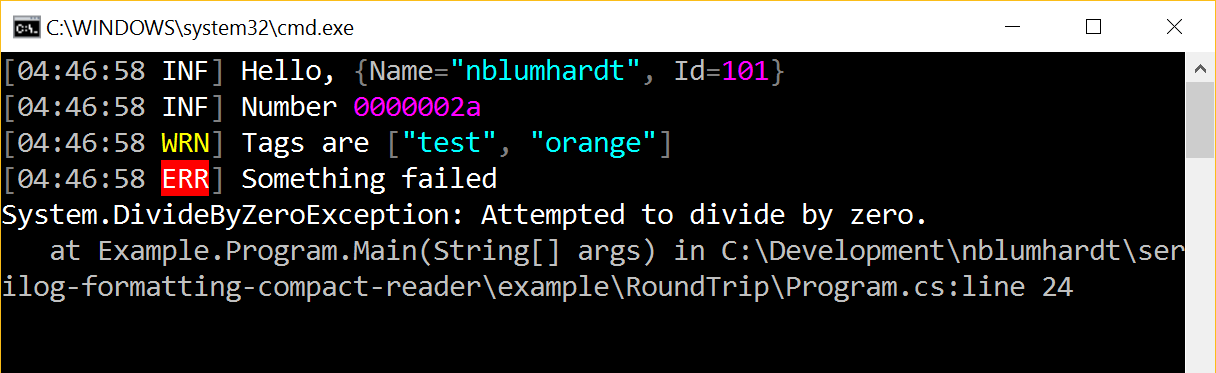
Output from the logger:
Limitations
Events deserialized from JSON are for typical purposes just like the original log events. There are two main things to keep in mind:
- JSON doesn't carry all of the type information necessary to determine if, for example, a number is an
intor afloat. JSON.NET does a good job of deserializing anything that it encounters, but you can't rely on the types here being identical. - Exceptions deserialized this way aren't instances of the original exception type - all you can do with them is call
ToString()to get the formatted message and stack trace, which is what 99% of Serilog sinks will do.